 erkemoz
← All programs

Erkemoz - Auto Clicker
A free auto clicker and key presser for Windows.
Latest version: v1.9 · ≈ 21 MB · Windows 10 / 11 · 64-bit · free
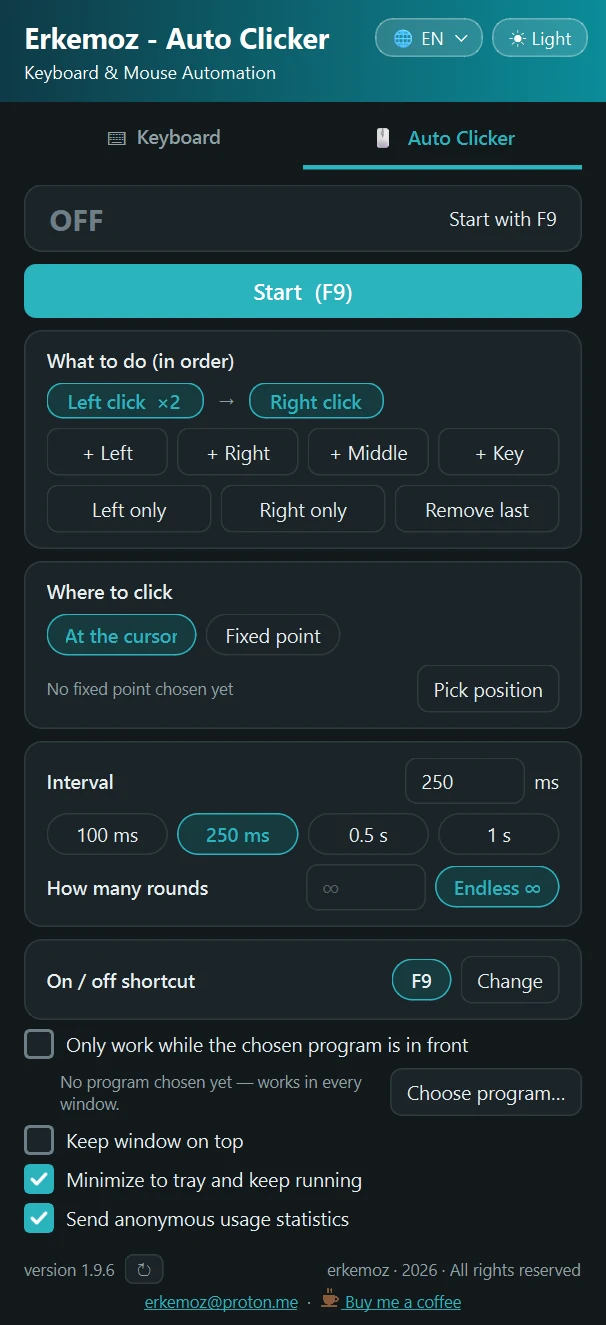
Shown in your chosen language and theme.
What it does
- Keyboard: hold one or more keys down, or press and release them at any interval — a set number of times or indefinitely.
- Auto clicker: left, right or middle click, or your own combo (e.g. Left → Left → Right → E).
- Clicks at the cursor or at a fixed point you pick.
- A separate on/off shortcut for each tool (F8 / F9 by default), fully customizable.
- Works in every window — or only while a program you choose is in the foreground.
- Keeps running in the system tray when minimized; light/dark theme; 8 languages.
Installation
- Download the installer and run it.
- If Windows shows "Windows protected your PC" (SmartScreen), click "More info" → "Run anyway". This warning appears because the program isn't signed with a paid certificate yet.
- Open the program, pick your keys or clicks, then start and stop it with the shortcut.
Good to know
- Windows doesn't allow sending keys or clicks to windows running as administrator (e.g. Task Manager).
- Some online games forbid automated input. Following a game's rules is your responsibility.
- Only download from erkemoz.app — modified copies won't run.

Find the tools useful?
They're free and will stay free. If one saved you some time, you can buy me a coffee — it helps keep new programs coming.