 erkemoz
← All programs
Erkemoz - Game Mods
A free Windows app that installs Turkish game patches, mods and cheats and keeps them up to date.
Latest version: v1.0.2 · ≈ 23 MB · Windows 10 / 11 · 64-bit · free
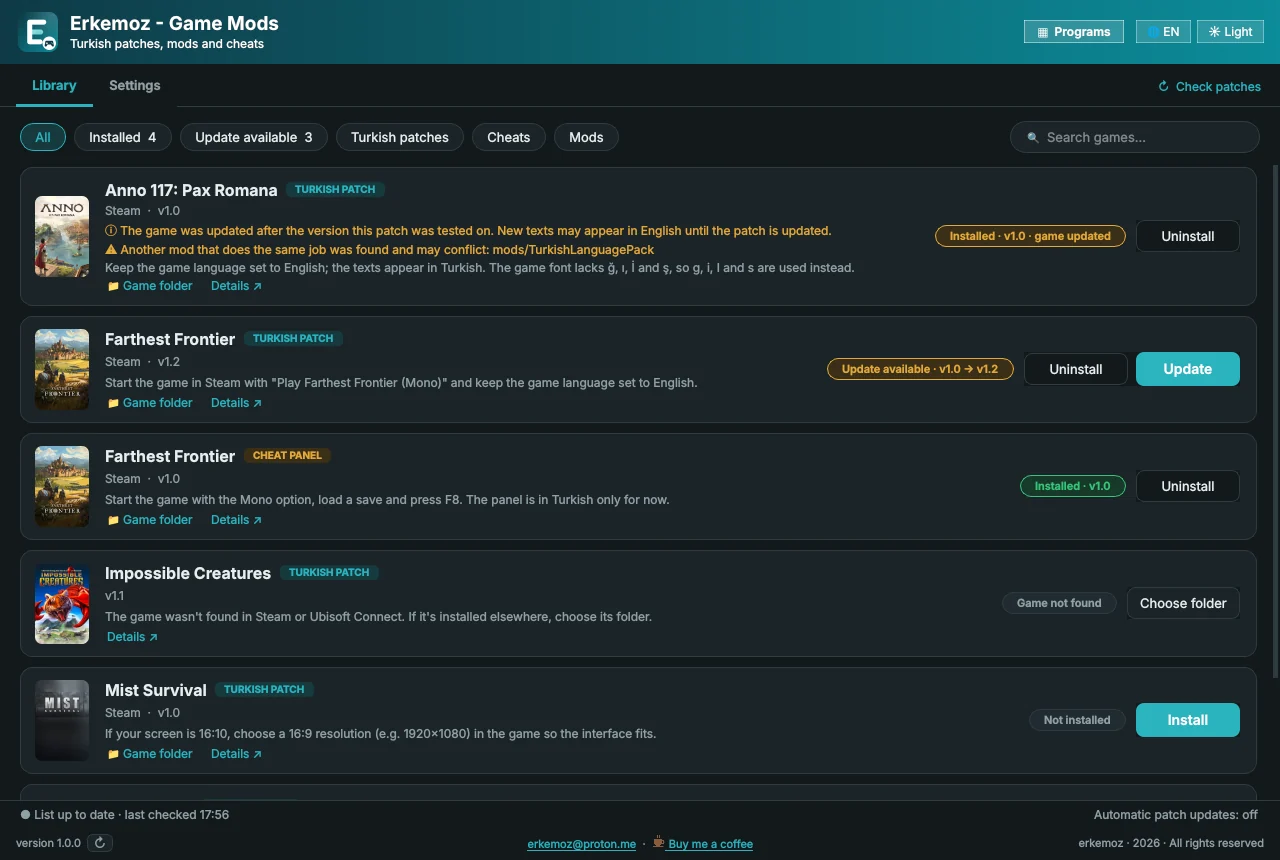
Shown in your chosen language and theme.
What it does
- Shows every Turkish patch, mod and cheat in one list; installs, updates and removes them with one click.
- Finds your games by itself in Steam libraries and Ubisoft Connect. If a game is installed elsewhere, you pick the folder.
- When a game updates, a patch that could crash it is set aside before you launch the game, and reinstalled automatically once a compatible version is out.
- Updates a patch automatically when a new version is out. It also recognizes patches you installed by hand from this site.
- New patches, mods and cheats show up in the list automatically as they're added — no app update needed.
- The Programs button lets you download and install the other free erkemoz apps. Lightweight: patches aren't bundled, they're downloaded only when you install them.
- Light/dark theme; 8 languages.
Installation
- Download the installer and run it.
- If Windows shows "Windows protected your PC" (SmartScreen), click "More info" → "Run anyway". This warning appears because the program isn't signed with a paid certificate yet.
- Open the app; your games are found automatically. Click Install next to the patch you want.
Good to know
- Every patch is downloaded from GitHub and installed only if its SHA-256 fingerprint matches. If a patch overwrites a game file, the original is backed up first and restored when you remove the patch.
- When you close the window, it keeps running as an icon next to the clock, so it can set a patch aside in time when Steam updates a game. You can turn this off in Settings.
- The patches are made and tested on the Steam versions. If something goes wrong on another platform, write to [email protected].
- Only download from erkemoz.app — modified copies won't run.

Find the tools useful?
They're free and will stay free. If one saved you some time, you can buy me a coffee — it helps keep new programs coming.